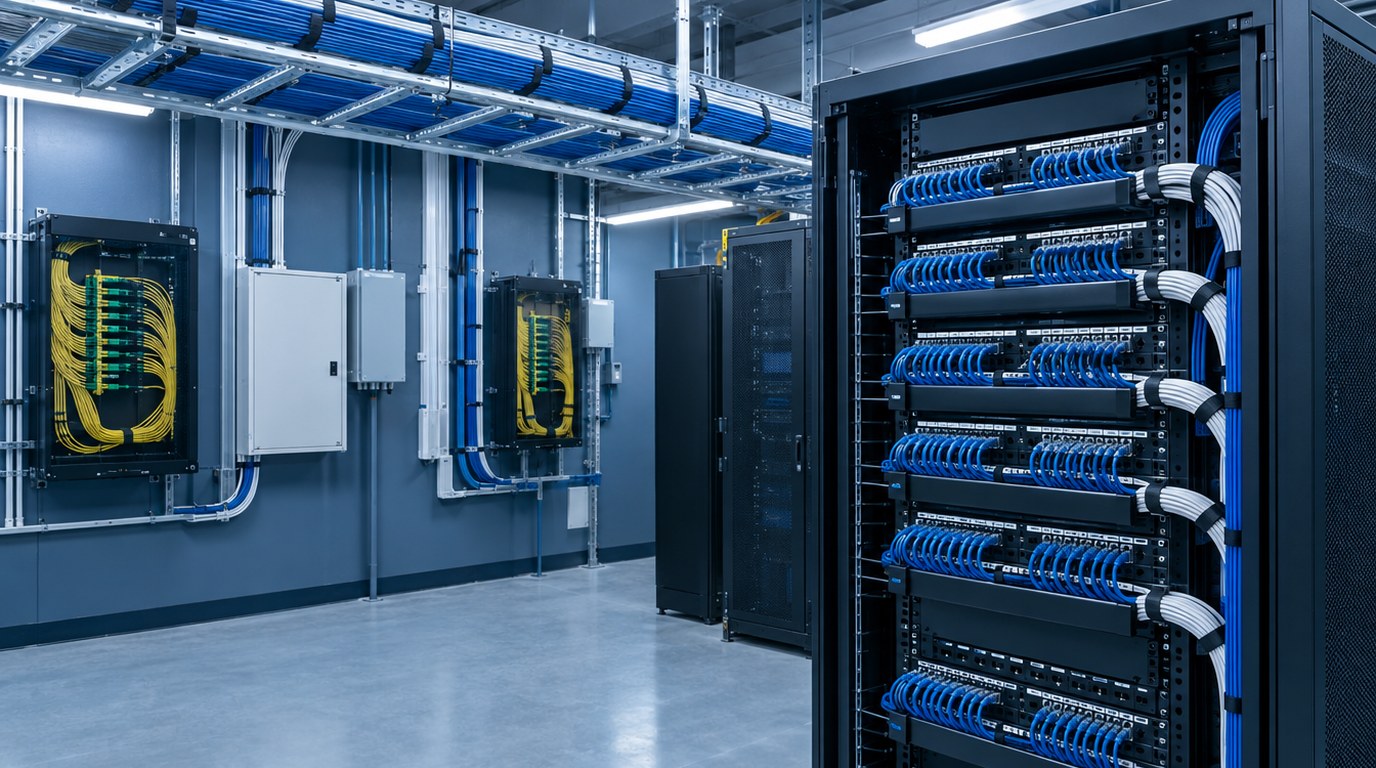
- TIA-568 defines how generic cabling is laid out, built and tested, so networks can change equipment without rewiring walls.
- Horizontal cabling follows a star topology with a 90 meter permanent link and a 100 meter channel limit.
- Category 6A copper and OM4 or single-mode fiber are the common choices for new commercial work.
- Spaces and pathways are covered by a companion standard, TIA-569, and bonding by TIA-607, and both shape the architecture.
- Power over Ethernet, Wi-Fi density and cybersecurity now influence cable counts and room sizes.
- Documented testing and labeling at closeout protect the owner for the life of the building.
- What Is Structured Cabling?
- How a Structured Cabling System Works
- Cable Types and Media Choices
- Standards and Code Requirements
- Applications by Building Type
- Design Process and Deliverables
- Special Cases and Emerging Demands
- How to Specify and What Drives Cost
- Best Practices, Mistakes and Testing
- Where Budlong Delivers This
- Related Reading
- Frequently Asked Questions
Every tenant eventually asks the same question: why does the network feel slow, and why does every move or change cost so much? In many commercial buildings the answer sits behind the ceiling, in cabling that was installed one project at a time with no governing plan. A structured approach replaces that patchwork with a standardized system that can carry voice, data, video, security and building controls for decades.
This article walks through how structured cabling is designed under the TIA-568 family of standards, written for owners, architects, developers and facility managers. Budlong has supported complex building projects since 1958, and our technology services and electrical engineering teams plan cabling alongside power, cooling and architecture so that the network never becomes an afterthought.
1. What Is Structured Cabling?
Structured cabling is a standardized, vendor-neutral cabling infrastructure that connects work areas, telecommunications rooms, equipment rooms and service entrances through a defined hierarchy. Instead of running a dedicated cable from one device to another, the design builds a permanent plant of horizontal and backbone cables ending at organized patch panels. Changes are then made by moving a patch cord, not by pulling new wire.
The Six Subsystems
The TIA-568 model divides a building into recognizable parts, and most designs follow it closely.
- Entrance facility: where outside plant cables enter and the carrier hands off service.
- Equipment room: the main hub for core switching, servers and demarcation equipment.
- Telecommunications rooms: floor-level closets that serve nearby work areas.
- Backbone cabling: links between the entrance facility, equipment room and telecommunications rooms.
- Horizontal cabling: permanent runs from the telecommunications room to each outlet.
- Work area components: outlets and cords that connect user devices.
Why Standards Matter
The Telecommunications Industry Association publishes the standards, and the American National Standards Institute recognizes them as American National Standards. Because the requirements are independent of any manufacturer, an owner can later change switches, access points or cameras without revisiting the cabling plant.
Also Read: Low Voltage Design Best Practices for Commercial Buildings
2. How a Structured Cabling System Works
Think of the system as a tree. Carrier circuits arrive at the entrance facility and extend to the equipment room. Backbone cables then run vertically or across campuses to each telecommunications room. From there, horizontal cables fan out in a star pattern to every outlet. Each connection point is a patch panel or a cross-connect, which gives the network manager one organized place to change connectivity.
Distances and Channel Limits
For balanced twisted-pair copper, the permanent link from the patch panel to the outlet is limited to 90 meters, and the channel, which includes cords at both ends, is limited to 100 meters. These limits protect signal quality, and they drive how many telecommunications rooms a floor needs. A designer measures actual cable routes, not straight-line distances, because routes follow corridors and climb into trays.
Outlets and Density
The standard calls for at least two horizontal cables to each work area, and modern practice is more generous. Wireless access points, cameras, door controllers, room scheduling panels and smart building sensors all need their own cable runs. Count these devices early, because they often outnumber desk outlets.
3. Cable Types and Media Choices
Choosing the media is the most visible design decision, because it sets both capacity and cost. TIA-568.2 covers balanced twisted-pair copper and TIA-568.3 covers optical fiber.
Balanced Twisted-Pair Copper
Category 6A supports 10 gigabit Ethernet over a full 100 meter channel and is the usual specification for new commercial buildings. Category 6 supports 10 gigabit only over shorter distances, and Category 5e is considered a legacy grade. Category 8 exists for short links in data centers and is not typically used in office horizontal cabling.
Optical Fiber
Multimode fiber, such as OM3, OM4 and OM5, serves backbone runs inside a building or between nearby buildings. Single-mode fiber, designated OS2, serves long runs, campuses and carrier handoffs. Fiber has no electrical interference issues, carries far more bandwidth than copper and is immune to ground potential differences between buildings.
| Media | Typical use | Strength | Consideration |
|---|---|---|---|
| Category 6A copper | Horizontal runs to desks and access points | 10 gigabit at 100 meters, handles PoE well | Larger diameter, needs more tray space |
| Category 6 copper | Budget horizontal runs | Lower cost, smaller cable | Limited 10 gigabit reach |
| OM4 multimode fiber | Riser backbone and data center links | High speed at moderate distance | Needs matching transceivers |
| OS2 single-mode fiber | Campus links and carrier handoffs | Very long reach, future-proof | Higher optics cost |
| Coaxial and other legacy | Existing video and special systems | Works with legacy devices | Rarely used in new work |
Cable Jackets and Fire Ratings
The jacket rating must match the space it passes through. Plenum-rated cable is required in air-handling spaces, riser-rated cable in vertical shafts and general-purpose cable in other locations, as defined by NEC Article 800. Mixing ratings is a common field error that inspectors catch.
4. Standards and Code Requirements
Structured cabling design depends on a group of documents rather than a single one.
The Standards Family
- TIA-568 series: topology, cable performance, connecting hardware and testing.
- TIA-569: pathways and spaces, including room sizes, tray and conduit planning.
- TIA-606: administration, labeling and records.
- TIA-607: bonding and grounding for telecommunications.
- TIA-942: data center infrastructure when a server room is part of the project.
Electrical and Fire Codes
The National Electrical Code, published by NFPA, governs communications circuits in Article 800 and limited-power circuits in Article 725. These articles control cable listing, separation from power wiring and fire-resistant penetrations. Firestop systems at rated walls and floors are listed and tested, and manufacturers such as those certified by UL Solutions publish approved assemblies. Always restore a rated barrier with a listed system after cabling passes through it.
Ethernet and Power Standards
The IEEE develops the 802.3 Ethernet family, including the power over Ethernet amendments that now deliver tens of watts to each port. These standards define what each channel must carry, and the cabling design must keep pace with them.
California Considerations
California adopts the model electrical and building codes with amendments, and the state’s 2025 Title 24 took effect on 1 January 2026. Schools reviewed by the Division of the State Architect and hospitals reviewed by HCAI have additional technology and infrastructure requirements. The U.S. Department of Energy also publishes guidance on building technologies that influence how sensors and controls are networked. Always confirm the edition in force at permit.
Fire safety wiring is not the same as structured cabling. Fire alarm circuits follow their own rules, so coordinate with the fire and life safety design rather than sharing pathways without checking the code.
5. Applications by Building Type
The same standards apply everywhere, but occupancy sets density, resilience and growth.
Corporate Offices and Creative Workplaces
Offices need flexible floor plates with outlets on a regular grid, ceiling zones for wireless access points and enough capacity to handle video collaboration. Media and technology tenants add high bandwidth demands for content creation. Budlong’s portfolio includes projects such as the Netflix buildings on Seward Street, the Riot Games office building and Universal DreamWorks, where infrastructure had to support intensive creative work. See our commercial practice for more on workplace systems.
Education Campuses
Schools and universities connect classrooms, labs, security cameras and public address systems across multiple buildings. Fiber backbones between buildings, with copper to the room, is the typical pattern. Our education team plans for state agency review and long equipment lifecycles.
Mission-Critical and Data-Intensive Facilities
Server rooms, trading floors and control centers need redundancy, diverse pathways and tight discipline on labeling. Review our mission critical page and the article on power distribution system design for data centers, because cabling and power must be coordinated in the same rooms.
Hospitality, Retail and Multi-Tenant Buildings
Hotels carry guest networks, back-of-house systems and entertainment platforms. Multi-tenant towers must separate tenant cabling from base building systems and plan riser capacity for future occupants.
Planning a New Building or Tenant Fit-Out?
Bring us in before the ceiling plan is frozen so that rooms, pathways and cabling grades are set while changes are still cheap.
6. Design Process and Deliverables
Good cabling design begins with the people and devices that will use the network, then works outward to the rooms and pathways that serve them.
Process
- Gather requirements. Interview the owner and information technology staff about devices, applications, security zones and growth.
- Set the topology. Define the number and location of telecommunications rooms, risers and the equipment room.
- Select the media. Choose copper category and fiber type for each link class.
- Plan pathways. Size trays, conduits, sleeves and slots, and coordinate them with structure and mechanical systems.
- Design the rooms. Lay out racks, ladder rack, grounding, power and cooling.
- Document and bid. Issue drawings, details, a labeling scheme and specifications.
Deliverables
| Document | Content | Used by |
|---|---|---|
| Outlet and device plans | Locations, counts and cable types for every drop | Cabling contractor |
| Riser and backbone diagram | Fiber and copper counts between rooms | Owner and installer |
| Room layouts and elevations | Rack positions, tray, grounding and power | Architect and electrical team |
| Pathway details | Tray sizes, sleeves and firestop locations | General contractor |
| Specifications and labeling | Products, testing, warranty and TIA-606 scheme | Contractor and facility manager |
These sheets belong in the same package as power and lighting. See how a full set is organized in our guide to electrical engineering design services and the CD package, and how MEP drafting services keep the drawings consistent. Coordination in a shared model, described in MEP BIM coordination and clash detection, catches tray conflicts before they reach the field.
Also Read: MEP BIM Coordination and Clash Detection
7. Special Cases and Emerging Demands
Power over Ethernet at Scale
Lighting fixtures, displays and sensors are increasingly powered through data cables. Higher power levels mean more heat in the cable bundle, so designers limit bundle size, choose Category 6A and verify ambient temperature in the pathway. Power budgets at the switch also need coordination with the electrical design.
Wireless Density and Wi-Fi Standards
Newer Wi-Fi generations can push multi-gigabit rates to each access point, which exceeds what older Category 5e and 6 cable can sustain at distance. Pulling two Category 6A drops to every access point location provides redundancy and headroom.
Security, Audio-Visual and Building Systems
Cameras, access control and conference room technology share the same plant. The article on security and audio-visual integration explains how these systems interact. Smart controls, covered in our posts on integrating smart building technology and smart technology solutions in MEP, add many low-bandwidth endpoints that still need a managed home in the telecommunications room.
Cybersecurity and Network Segmentation
Operational technology networks should be separated from corporate data. Physical design supports this by giving each system its own patch field and rack space. The National Institute of Standards and Technology publishes widely used guidance on securing connected systems.
8. How to Specify and What Drives Cost
A clear specification describes performance, not just products. State the cable category, the standards to be met, the testing required, the labeling system, the warranty and the documentation to be delivered at closeout. Require a manufacturer-backed system warranty where the owner values long-term support.
What Moves the Price
- Outlet count: the biggest driver, so confirm device schedules before bid.
- Cable grade: Category 6A costs more per foot and per termination than Category 6.
- Pathways: tray, sleeves and firestopping often rival the cost of the cable itself.
- Room build-out: racks, cooling, backup power and grounding.
- Ceiling and access conditions: hard lid ceilings and occupied floors slow installation.
- Testing and documentation: thorough records cost less than discovering faults after move-in.
Because cabling is a modest percentage of total construction cost but a major factor in operating flexibility, an overly cheap bid is usually a false economy. Our early coordination article, why early MEP coordination reduces rework, explains why decisions made before the ceiling closes pay back so quickly.
Also Read: Why Low Voltage Design Is Ideal for New Construction
9. Best Practices, Mistakes and Testing
Best Practices
- Keep every horizontal run comfortably under the 90 meter limit, with allowance for service loops.
- Respect minimum bend radius, which is typically four times the cable diameter for four-pair copper, and limit pulling tension to the manufacturer rating.
- Support cable with J-hooks or tray rather than laying it on ceiling grid or pipes.
- Fill conduit within the NEC fill limit and size tray for at least the planned count plus growth.
- Bond all metallic pathways and racks to the telecommunications grounding system.
- Label both ends of every cable and every patch panel port according to TIA-606.
Common Mistakes
- Placing telecommunications rooms directly under a plumbing riser or next to an electrical room with large transformers.
- Forgetting cooling and dedicated power for the room.
- Running cable tight against fluorescent ballasts or large motors.
- Treating the cabling as a late addition to the ceiling plan.
- Accepting copper test results without reviewing the saved reports.
Testing and Acceptance
| Link type | Test method | What it proves |
|---|---|---|
| Copper horizontal | Permanent link or channel certification | Wire map, length, attenuation, crosstalk and return loss meet the category |
| Category 6A in bundles | Added alien crosstalk sampling where required | Adjacent cables do not interfere |
| Multimode and single-mode fiber | Loss test with a light source and power meter | Total loss is within the link budget |
| Long or complex fiber | Optical time domain reflectometer trace | Individual splices and connectors perform as designed |
Independent verification before turnover helps, and our commissioning services extend to technology rooms, cooling and power that support the network. A dedicated MEP engineering review at the end of construction confirms that as-built conditions match the design.
- TIA-568 gives owners a vendor-neutral cabling plant with clear distance, performance and test criteria.
- Use Category 6A for most new horizontal work and OM4 or single-mode fiber for backbones.
- Count every device, not just desks, and plan two drops per access point.
- Coordinate rooms, pathways, cooling and power with the architect and electrical engineer from the start.
- Specify testing, labeling and documentation, and review the results before accepting the work.
- Reserve growth space in rooms, tray and riser capacity.
10. Where Budlong Delivers This
With offices in Glendale, downtown Los Angeles, Camarillo and Fremont, Budlong serves Los Angeles, Ventura, Orange, San Bernardino, Riverside and Santa Barbara counties. Our local teams understand how each jurisdiction handles low-voltage permits and inspections.
11. Related Reading
12. Frequently Asked Questions
What does TIA-568 actually cover?
TIA-568 is a family of standards for generic telecommunications cabling in commercial buildings. It defines topology, distances, balanced twisted-pair and optical fiber performance, connecting hardware and test methods so that a cabling plant works with equipment from any vendor.
What is the maximum length of a horizontal cable run?
The permanent link is limited to 90 meters, and the full channel, including patch cords at both ends, is limited to 100 meters. Designers keep a margin below those limits so that field changes and cable routing do not push a run over the limit.
Should a new building use Category 6 or Category 6A cable?
Category 6A is the safer choice for most new commercial projects because it supports 10 gigabit Ethernet over the full 100 meter channel and carries higher power over Ethernet loads with less temperature rise. Category 6 can be adequate where budgets are tight and speeds above 1 gigabit are unlikely.
When is fiber better than copper in a commercial building?
Fiber is the standard choice for backbone links between telecommunications rooms, for runs beyond copper distance limits, for high-speed data center links and where electrical noise or grounding differences are a concern. Copper remains the practical choice for the final connection to desks and wireless access points.
How many telecommunications rooms does a building need?
A common rule is at least one room per floor, with additional rooms where a floor is large enough that the longest horizontal run would exceed the distance limit. The right count is set by the floor layout, the outlet density and the planned growth of the tenant.
Does power over Ethernet change the cabling design?
Yes. Higher power levels heat the cables, especially in large bundles and warm ceiling spaces, which increases attenuation. Designers respond by choosing larger conductors or Category 6A, limiting bundle sizes and checking ambient temperature in the pathway.
How should cabling be separated from electrical wiring?
Communications cable must be kept apart from power conductors according to the National Electrical Code and the pathway standard. Crossing at right angles is preferred over running in parallel, and dedicated cable tray or conduit is the cleanest way to prevent interference and code violations.
What testing should be required at project closeout?
Require a permanent link or channel test of every copper run with saved results, and a loss test of every fiber link. Larger projects add optical time domain reflectometer traces for long or complex fiber paths. The specification should state pass criteria and the format of the delivered test reports.
Who should design structured cabling on a project?
An engineer experienced in low-voltage and technology systems should prepare the design and coordinate it with the architect, the electrical engineer and the owner’s information technology team. Early involvement keeps room sizes, pathways and cooling aligned with the equipment that will occupy them.